
How to check your balance
STEP1
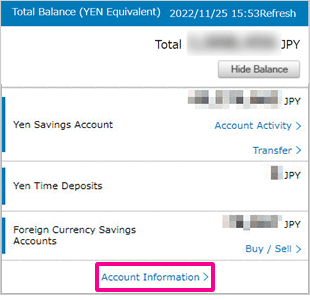
Login to PowerDirect. You can check your balance on the Accounts top page.
If you would like to check your transaction details, please select"Account Information".
STEP2
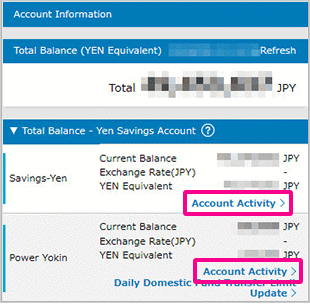
Tap the"Account Activity"you would like to see.
STEP3
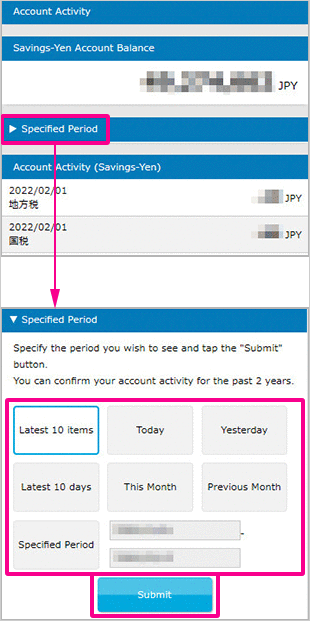
On"Account Activity"page, you can check your transaction details.
It shows the most recent 10 transactions.
If you wish to view the transactions during a certain period, please select the"View past account activity"and tap submit.
Then you can see the list of the transactions you have chosen.
STEP4
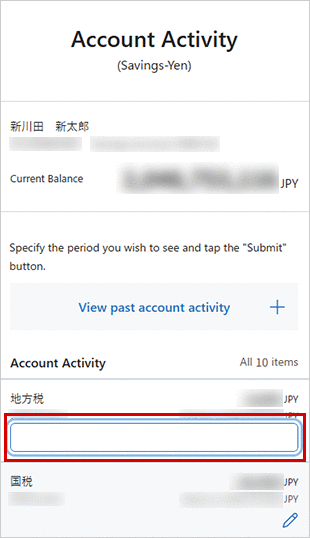
You can add a custom note for each transaction.
Tap the pencil icon in the"Memo"field, enter your note, and tap outside the input area to save it.
 Close
Close