
【重要】スマホ認証(VIP Access)は2026年6月27日に終了します
スマホ認証(FIDO)の登録方法に関しては、以下のページもご確認ください。
スマホ認証(FIDO)の登録方法
アプリのご利用にはスマホ認証(FIDO認証)が必要ですが、webブラウザ(パワーダイレクトパワーダイレクト)は認証方法に関わらずご利用可能です。
スマホ認証サービスの変更予定について(2026年4月14日更新)
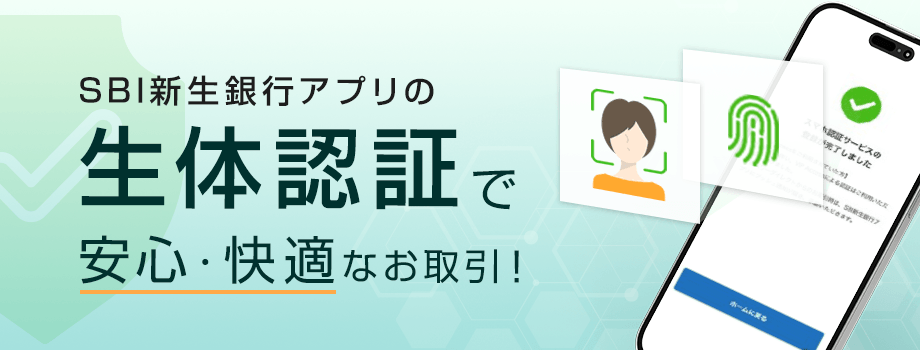
平素よりSBI新生銀行をご愛顧いただき誠にありがとうございます。
当行は、2026年3月29日に、スマホ認証サービスを従来の「VIP Access」アプリによる認証から、「SBI新生銀行アプリ」による認証へ変更しました。
これにより、パワーダイレクト(インターネットバンキング)およびSBI新生銀行アプリにおいて、セキュリティの強化と利便性の向上を実現しています。
変更内容
- 現在のスマホ認証(VIP Access):取引時に「VIP Access」アプリにプッシュ通知が届き、取引内容を承認
- 新しいスマホ認証(FIDO):取引時に「SBI新生銀行アプリ」にプッシュ通知が届き、スマートフォンの生体認証を利用して取引内容を承認
取引時の認証専用アプリである「VIP Access」による認証は不要となり、「SBI新生銀行アプリ」のみで認証が可能となりました。特にSBI新生銀行アプリをご利用の場合は、取引から認証までをひとつのアプリで完結できるため、よりスムーズにお手続きいただけます。
スマホ認証(FIDO)の特長
新しいスマホ認証は、オンライン認証の国際標準規格「FIDO(ファイド)」に準拠しています。お客さまのスマートフォンに登録された本人確認情報(生体認証)を利用することで、「VIP Access」アプリを利用した認証よりも安全にお取引いただけます。
スマホ認証(FIDO)の登録方法
スマホ認証(FIDO)の利用方法
SBI新生銀行アプリでお取引(振込)の場合
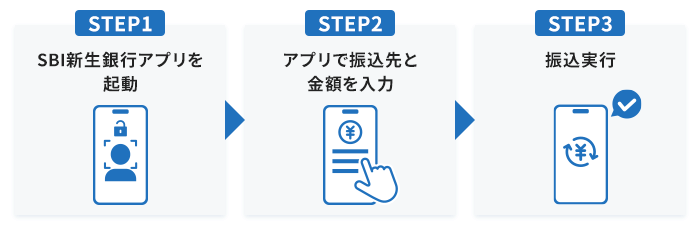
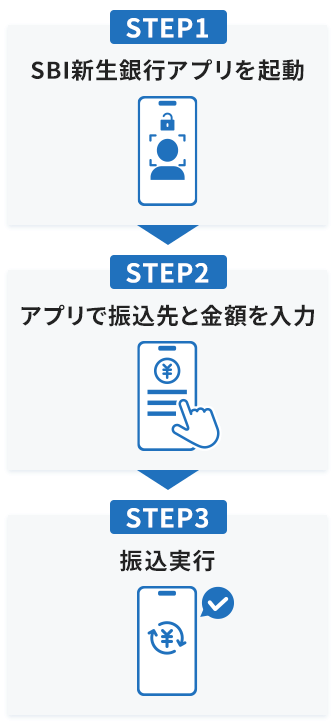
パワーダイレクトでお取引(振込)の場合
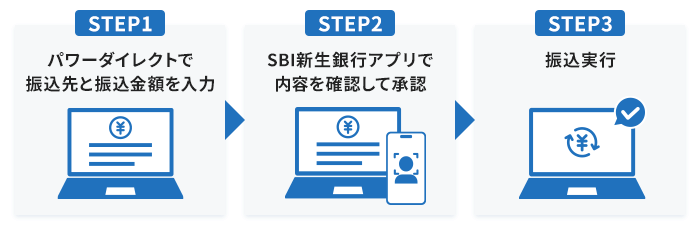
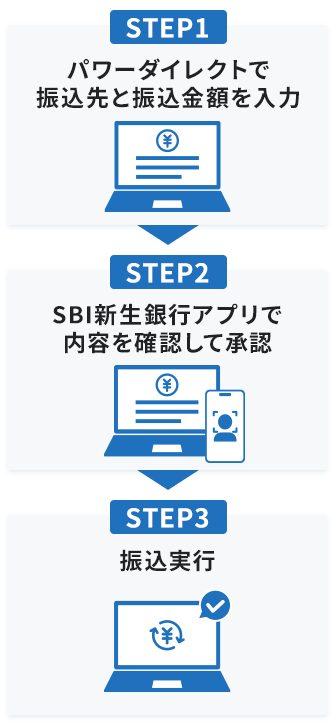
詳しくは、スマホ認証サービスのページをご確認ください。
移行について
これまでスマホ認証としてご利用いただいていた「VIP Access」は、2026年6月頃にサービスを終了します。
2026年3月29日以降にSBI新生銀行アプリを最新バージョンにアップデート(自動アップデートを含む)している場合、アプリの利用にはスマホ認証(FIDO)の登録が必須です。最新バージョンのアプリでの取引には「VIP Access」はご利用いただけず、webブラウザ(パワーダイレクト)からのお取引のみ「VIP Access」はご利用可能です。
サービス終了後は、「VIP Access」による認証は利用できなくなりますので、スマホ認証(FIDO)の登録、または電話認証・SMS認証のいずれかを利用していただく必要がございます。
電話認証・SMS認証を利用する場合、パソコンやスマートフォンなどのWebブラウザ(パワーダイレクト)から振り込みを行う際の、1日あたりの振込限度額の上限は200万円となります。
また、サービス終了後にスマホ認証(FIDO)を登録する際は、マイナンバーカードまたは運転免許証などによる本人確認が必要です。
- スマホ認証(VIP Access)の新規登録は、すでに受け付けておりません。
2026年4月
SBI新生銀行
Planned Change to Smartphone Authentication
Thank you for using SBI Shinsei Bank.
On April 10, 2026, we transitioned our smartphone authentication service from the “VIP Access” app to authentication via the “SBI Shinsei Bank App.”
As a result, security and convenience have been enhanced for both PowerDirect (internet banking) and the SBI Shinsei Bank App.
Details of the Change
- Current authentication (VIP Access)
When making a transaction, a push notification is sent to the “VIP Access app" and you approve the transaction within that app. - New authentication (FIDO)
When making a transaction, a push notification is sent to the “SBI Shinsei Bank App,” where you approve the transaction using your smartphone’s biometric authentication.
Authentication via the transaction-specific app “VIP Access” is no longer required, and authentication can now be completed using only the “SBI Shinsei Bank App.”
In particular, when using the SBI Shinsei Bank App, both transactions and authentication can be completed within a single app, allowing for a smoother process.
- Please note that the SBI Shinsei Bank App is available in Japanese only. Some FIDO authentication notifications may also appear in Japanese.
Features of the New Smartphone Authentication
The new smartphone authentication uses the international FIDO standard and leverages your smartphone’s biometric authentication to provide stronger security than the “VIP Access” app.
How to Use the New Smartphone Authentication
Transaction (domestic transfer) via SBI Shinsei Bank app
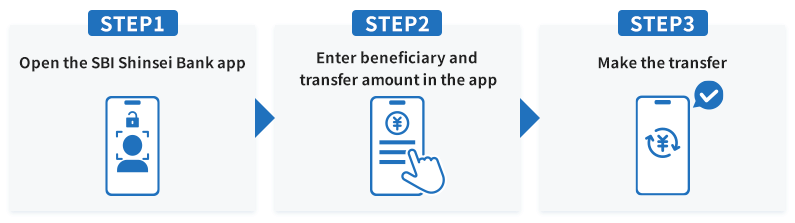
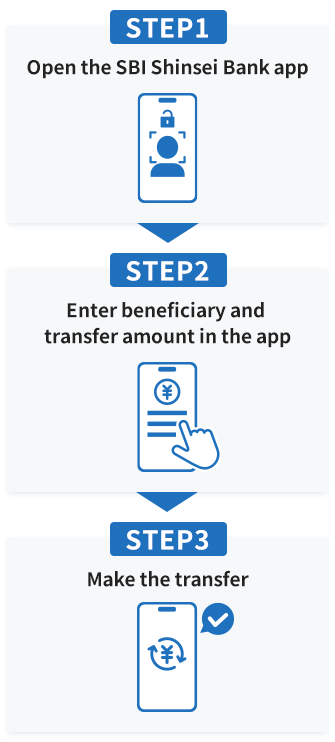
Transaction (domestic transfer) via PowerDirect
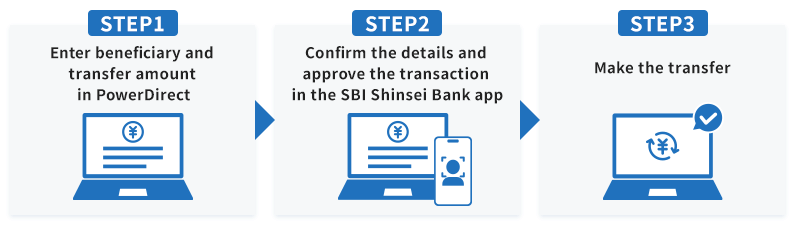
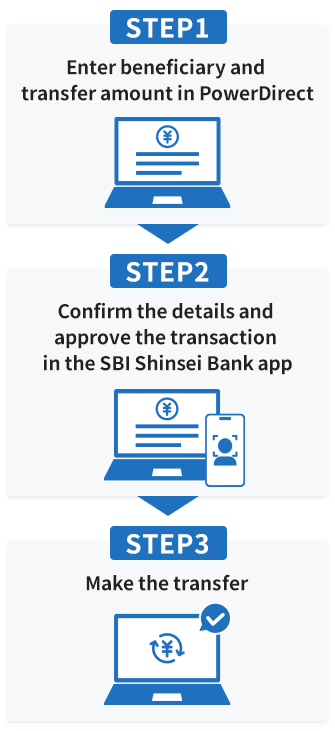
For more details, please visit the Smartphone Authentication Service page.
Transition Schedule
The current “VIP Access” service is scheduled to be discontinued around June 2026.
If you have updated the SBI Shinsei Bank app to the latest version on or after March 29, 2026 (including automatic updates), registration for smartphone authentication (FIDO) is required in order to use the app.
“VIP Access” cannot be used for transactions made within the latest version of the app. “VIP Access” is available only for transactions conducted via a web browser (PowerDirect).
After the service termination, authentication using “VIP Access” will no longer be available. You will be required to register for smartphone authentication (FIDO) or use either telephone authentication or SMS authentication.
If you use telephone authentication or SMS authentication, the maximum daily transfer limit for transfers made via a web browser (PowerDirect) on a computer or smartphone will be 2 million yen.
In addition, if you register for smartphone authentication (FIDO) after the service termination, identity verification using a My Number Card or a driver’s license will be required.
Please note that new registrations for smartphone authentication using “VIP Access” are no longer available.
April 2026
SBI Shinsei Bank